After you press start, the website will start recording in six second chunks. It will upload those recordings to a server that will let each cellphone download it and play it as a loop.
After every recording, it will add to the status bar "recording started" and "recording upload success." if these stop coming through as success, such as "ERROR.: TypeError: Failed to fetch", you might have lost internet connection and you should check on that. If your internet is working properly for other things, but this site is still failing, please text and call me: 512-217-2038 and I'll get on it ASAP.
Also, if you're going to perform the piece, please let me know so I can 1/ thank you profusely and 2/ make sure I don't accidentally break it.
Selecting the correct microphone
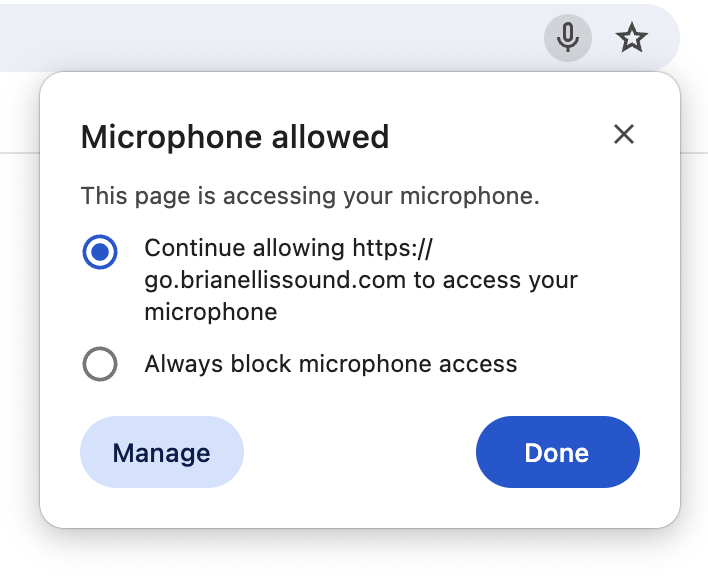
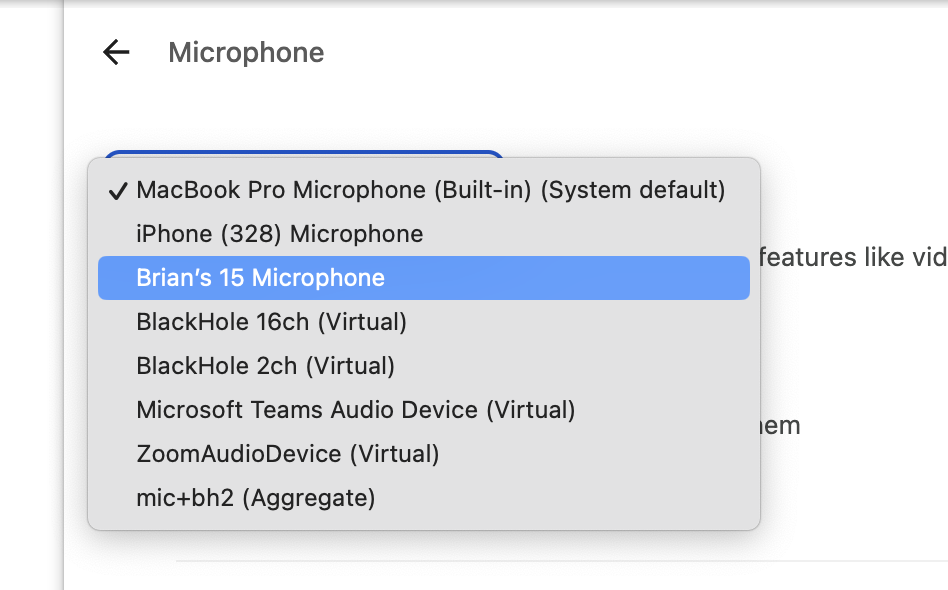
After you press start the first time, you should allow microphone settings and make sure chrome is pulling the correct microphone source. You can do this by pressing the little mic button in the search bar, and then "Manage", and then selecting your audio interface. After you change your microphone source, come back to this page and refresh the page.
Above: the mic button pressed, and the window showing you the ability to "Manage"
Above: after pressing manage, you are taken to a settings screen where you can select which microphone you would like to use. Select your audio interface.